> For the complete documentation index, see [llms.txt](https://help.rechat.com/llms.txt). Markdown versions of documentation pages are available by appending `.md` to page URLs; this page is available as [Markdown](https://help.rechat.com/guides/deals/manage-deal-information.md).
# Manage Deal Information
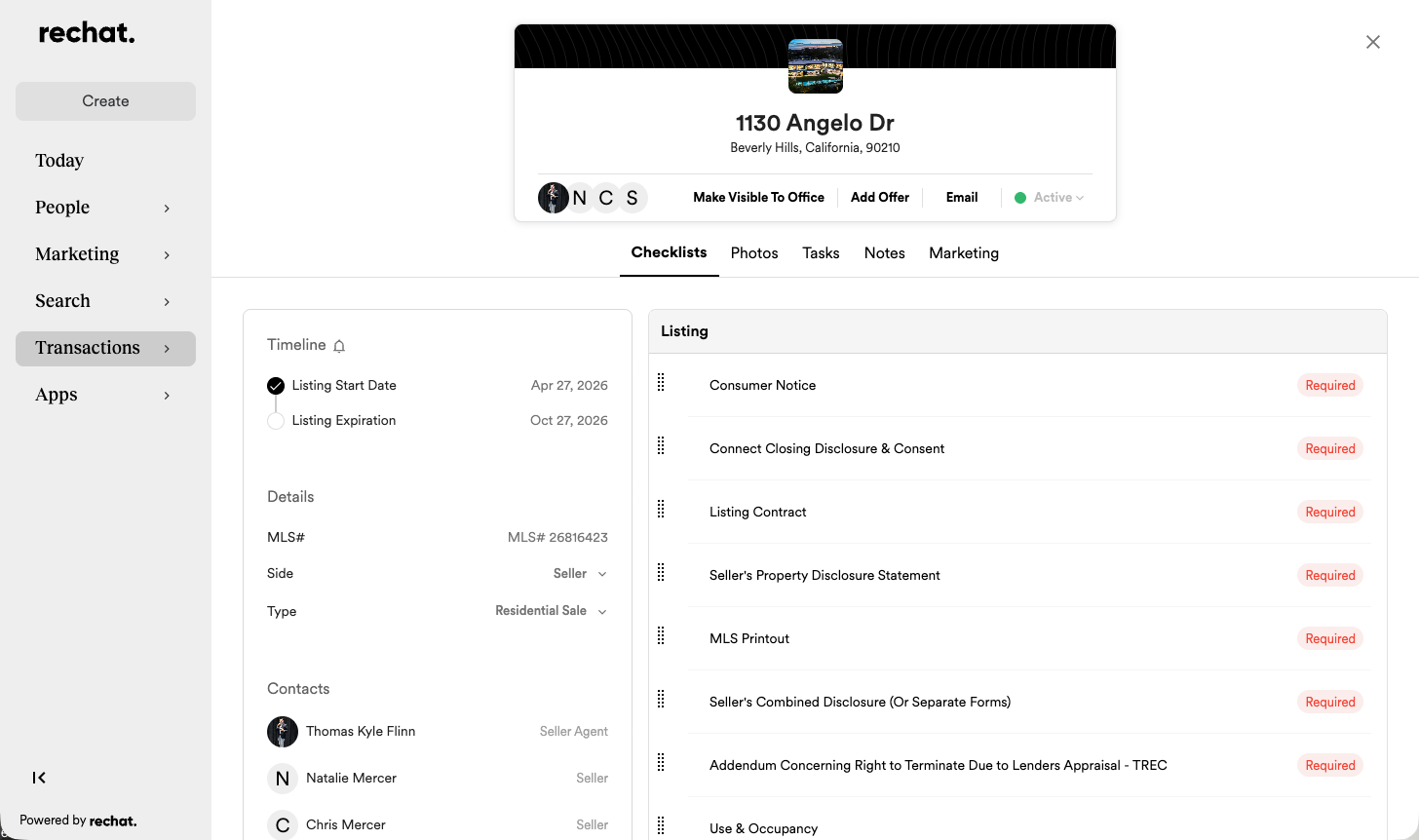
Keeping the information inside a Deal accurate helps Rechat organize the transaction, populate forms, display important deadlines, and connect the correct people to the record.
### Review the Timeline
The Timeline displays the dates associated with the current stage of the transaction. A listing may begin with dates such as:
* Listing Start Date
* Listing Expiration
After an offer or contract is added, the Timeline may also include:
* Executed Date
* Closing Date
* Possession Date
* Financing Due
* Inspection Date
* End of Option or other brokerage-specific deadlines
{% hint style="warning" %}
Dates displayed in your Deal depend on the transaction and brokerage configuration.
{% endhint %}
### Review Deal details
The Details section may include:
* MLS number
* Side represented
* Property or transaction type
Accurate details help Rechat apply the appropriate workflow and checklist.
### Manage contacts
The Contacts section identifies the people involved in the transaction and their roles. These may include:
* Buyer or Seller
* Buyer Agent or Seller Agent
* Title or escrow representative
* Transaction Coordinator
* Sales Manager
* Other brokerage-configured roles
Select **Add a New Contact** to associate another person with the Deal. Available roles may vary.
### Review financial and transaction information
Depending on the Deal, your permissions, and brokerage configuration, you may see information such as:
* List price
* Sales price
* Commission percentage
* Referral percentage
* CDA information
### Update incorrect information
Some information may be controlled by an MLS connection, brokerage configuration, or an administrator. If an expected field cannot be edited, confirm that the correct property and transaction details were selected.
### Related articles
* [Create a Deal](/guides/deals/create-a-deal.md)
* [Understand Your Deal Workspace](/guides/deals/understand-your-deal-workspace.md)
* [Add and Manage an Offer on a Listing](/guides/deals/add-and-manage-an-offer-on-a-listing.md)
---
# Agent Instructions
This documentation is published with GitBook. GitBook is the documentation platform designed so that both humans and AI agents can read, navigate, and reason over technical content effectively. Learn more at gitbook.com.
## Querying This Documentation
If you need additional information that is not directly available in this page, you can query the documentation by asking a question.
Perform an HTTP GET request on the following URL with the `ask` and `goal` query parameters:
```
GET https://help.rechat.com/guides/deals/manage-deal-information.md?ask=&goal=
```
`ask` is the immediate question: it should be specific, self-contained, and written in natural language.
`goal` is what the user is ultimately trying to achieve, the reason they need the answer. Sharing it helps GitBook give you a better, more relevant answer. A goal is most helpful when it describes the outcome the user wants rather than restating the question. For example, with `ask=how do I create an API token`, a goal like `automate deployments from our CI pipeline` lets GitBook tailor the answer to that use case.
The response will contain a direct answer to the question and relevant excerpts and sources from the documentation.
Use this mechanism when the answer is not explicitly present in the current page, you need clarification or additional context, or you want to retrieve related documentation sections.